
Android Auto and Carplay screen for BMW 4 Series F32 F33 F36
Android Auto and Carplay screen for BMW 4 Series F32 F33 F36
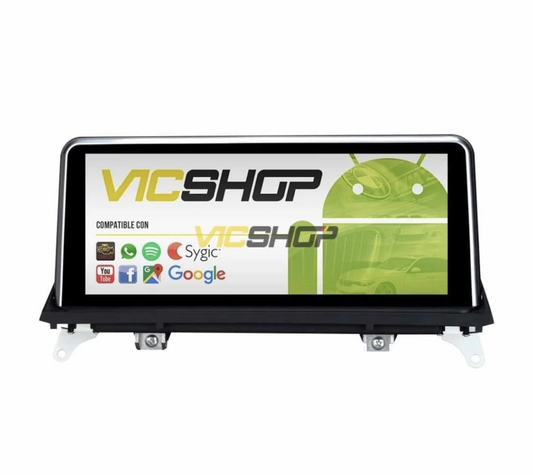
The Android Auto and Carplay screen for BMW 4 Series F32 F33 F36 transforms your driving experience with cutting-edge technology. Enjoy a modern and functional interface that not only improves the aesthetics of your car, but also its functionality. With this system, you will have access to multiple essential applications and functions while driving. Additionally, it provides seamless integration with the vehicle's existing functions, ensuring that every trip is safer and more entertaining. The cutting-edge technology used in this display ensures that you can enjoy a smooth and interruption-free user experience, allowing you to focus on what really matters: the road ahead. Plus, the ease of use and customizability make every interaction intuitive and enjoyable.
Technical characteristics
The Android screen for BMW 4 Series F32 F33 F36 comes in two sizes: 10.25 inches and 12.3 inches. It has a built-in DSP chip and offers an IPS multi-touch screen for superior image quality. This IPS technology ensures that colors are vibrant and viewing angles are wide, which is crucial for visibility in different lighting conditions. Additionally, the screen is designed to minimize sunlight reflection, ensuring that information is visible even on sunny days. The build quality of the screen is robust, ensuring durability and resistance to daily wear and tear. HD resolution provides exceptional image clarity, allowing every detail to be visible, which is especially useful when using navigation applications.
Additional specifications
The screen includes Wi-Fi, CarPlay and Android Auto compatibility, and a powerful integrated GPS with maps across Europe. In addition, it is compatible with ADAS DVR rear and front cameras and tire pressure monitoring systems. Wi-Fi connectivity allows for software updates and internet access, meaning you can download apps directly to the screen. This functionality is especially useful for drivers who want to keep their systems up to date without complications. It also has Bluetooth for connecting mobile devices, allowing you to make hands-free calls and stream music from your smartphone. The 64GB storage capacity ensures that you have enough space for apps and multimedia files, while the 4GB of RAM ensures smooth performance.
| Parameter | Value | Notes |
|---|---|---|
| Screen size | 10,25" / 12,3" | Depends on the model |
| Resolution | HD | - |
| RAM | 4GB | - |
| ROM | 64GB | - |
| Integrated GPS | Yes | Maps Europe |
| Connectivity | Wi-Fi, Bluetooth | For updates and multimedia |
Compatibility with BMW models
This screen is specifically compatible with BMW 4 Series F32, F33 and F36 models, including variations with CCC, CIC, NBT and EVO systems. This ensures that installation is simple and that the display works seamlessly with the vehicle's existing interfaces and controls. Compatibility with these systems means you can enjoy full integration without losing any of your car's original functions. It is important to note that this screen has been designed to fit perfectly into the design of the dashboard, maintaining the original aesthetics of the vehicle. Integration with existing car systems also means you won't have to worry about losing important functions like climate control or audio settings.
Compatibility details
| Body/series | years | Headlight type | Hoop position/diameter | Observations |
|---|---|---|---|---|
| BMW 4 Series F32/F33/F36 | Data not available | Data not available | Data not available | Compatible with CCC/CIC/NBT/EVO |
Advantages and benefits
Installing this screen in your BMW provides a wide range of benefits. It not only modernizes the interior of the vehicle, but also allows access to applications such as Spotify, Apple Music, and advanced navigation services. The ability to customize the interface to your personal preferences improves the driving experience, making each trip more pleasant and tailored to your needs. The screen also offers the ability to receive real-time notifications, such as traffic alerts and weather conditions, allowing you to better plan your routes. In addition, integration with voice assistants such as Siri or Google Assistant facilitates hands-free operation, increasing safety while driving.
Functionality and entertainment
With the ability to play 4K videos and use streaming apps, the screen offers a complete entertainment center that keeps passengers occupied during long journeys. Additionally, CarPlay and Android Auto compatibility allows drivers to easily access their favorite navigation and music apps without distractions, ensuring they always have access to the most up-to-date information while on the road. Integration with voice assistants such as Siri or Google Assistant facilitates hands-free operation, increasing safety while driving. The ability to multitask, such as listening to music while browsing, makes every trip more efficient and enjoyable.
Step by step installation
Installing the Android screen on your BMW is simple and quick. It is recommended to contact a specialized technician to ensure optimal installation, although the process is designed to be as plug-and-play as possible. This means that even if you're not tech-savvy, you can install the screen with minimal effort and time. Make sure you have all the necessary tools on hand before beginning the process to avoid interruptions. It is important to carefully follow the manufacturer's instructions to ensure a smooth installation. Additionally, proper installation ensures that the display operates efficiently and smoothly.
Installation Guide
- Remove the current screen from the dashboard. Be sure to disconnect all cables carefully to avoid damage.
- Connect the new display using the included cables and adapters. Follow the manufacturer's instructions to ensure a secure and stable connection.
- Configure the screen according to user preferences. Customize the interface and adjust audio and video settings for your comfort.
- Verify that all steering wheel controls still function correctly. This is crucial to maintaining the safety and functionality of the vehicle.
For more details, buy the screen for BMW.
Maintenance and care
To ensure optimal performance of your Android screen, keep the software updated and avoid contact with liquids that could damage the internal components. Software updates not only fix bugs, but can also improve system performance and add new features. It is advisable to periodically check the condition of the screen and its connections to avoid long-term problems. If you detect any fault, consult a specialized technician to avoid further damage. Additionally, regular maintenance helps extend the life of the device and ensures that it continues to function efficiently.
Care tips
Use a soft cloth to clean the screen and do not apply excessive pressure to the touch screen. Avoid using harsh chemicals that may damage the screen surface. Also, regularly check the connections to make sure there are no loose cables that could affect the performance of the system. Keeping the screen free of dust and fingerprints not only improves visibility but also extends the life of the device. Also, ensure that the environment inside the vehicle is free of excessive humidity, as this could affect the performance of the screen.
Real use cases
Many users have reported a significant improvement in their daily interaction with their vehicle thanks to the installation of this screen. From navigation to entertainment, the integration is seamless and efficient. Users highlight the ease of access to information and the ability to stay connected while on the move. This display has transformed the way drivers interact with their vehicles, providing a more intuitive and personalized experience. In addition, the ability to adapt the interface to individual preferences makes each trip unique and enjoyable.
User experiences
Drivers appreciate the ease of use and customizability that the display offers, improving the overall driving experience. One user commented that the screen transformed his vehicle, making it feel more modern and technologically advanced. Another user mentioned that the integrated GPS navigation has allowed him to explore new routes with confidence, knowing that he will always have access to up-to-date maps. Additionally, the ability to access music and entertainment apps has made long trips more enjoyable for the whole family. Users have also highlighted the screen's ability to integrate seamlessly with the steering wheel controls, making it easy to use while driving.
Common mistakes to avoid
Be sure to make all connections correctly during installation to avoid functionality issues. Also, always check the settings before finishing the installation. A common mistake is not properly securing the screen to the dashboard, which can cause unwanted vibrations or movements while driving. Additionally, it is crucial not to force the cables or connectors, as this could damage the internal components of the display. Attention to detail during installation is key to ensuring the system operates correctly and smoothly.
Typical errors
Failure to properly connect cables may result in the loss of certain functionality. Always follow the manufacturer's guides and recommendations. Also, make sure all components are securely fastened before turning on the system for the first time to avoid possible damage. Another common mistake is not updating the software after installation, which could limit the available features and affect the overall performance of the system. It is also important not to ignore any warnings or error messages that may appear on the screen, as they could indicate problems that need to be addressed.
Frequently asked questions
Some of the most common questions about the Android display for BMW are answered below. These answers are designed to clarify any questions you may have before making your purchase.
Does it fit perfectly?
Yes, this screen has been designed specifically for BMW 4 Series F32 F33 F36 models, ensuring a perfect fit and seamless integration with the vehicle's interior design.
Do I need any special cables?
No, all necessary cables are included with the display. This means you won't have to worry about searching for additional adapters or cables, simplifying the installation process.
Can I watch TV and listen to music simultaneously?
Yes, the screen allows you to multitask like watching TV and listening to music at the same time. This functionality is ideal for keeping passengers entertained during long trips.
Is it compatible with iPhone?
Yes, the screen is 100% compatible with iPhone, allowing Apple users to enjoy all their favorite applications directly from the car screen.
What happens if my radio does not have an AUX output?
In that case, an FM transmitter is provided to facilitate audio connection. This ensures that you can enjoy high-quality sound regardless of the limitations of your vehicle's original audio system.
Conclusion
The Android screen for BMW 4 Series F32 F33 F36 not only modernizes the interior of your vehicle, but also significantly increases the available functionalities, improving the driving experience in all aspects. With its intuitive design and advanced functionality, it is a worthwhile investment for any BMW owner looking to enhance their driving experience. Additionally, the ease of installation and available technical support ensure that you can enjoy all the benefits of this technology without complications. By choosing this screen, you are opting for a solution that not only improves the aesthetics of your vehicle, but also increases its value and functionality.
- bmw android screen
- bmw 4 series carplay
- android car bmw
- bmw multi touch screen
- bmw 4 series gps
- bmw multimedia player
- bmw iphone compatibility
- bmw 4 series update
- bmw screen installation
- bmw 4 series interfaces
Content reviewed by automotive technician.
It is important to check the specific compatibility of your BMW model in the technical data sheet before making the purchase. This will ensure that the screen works correctly with your vehicle and that you can enjoy all its features without problems. Attention to detail in component selection and proper display configuration are essential to maximizing the benefits of this technological upgrade. Additionally, having the right technical support can be crucial to resolve any questions or issues that may arise during installation or daily use.