
Android Auto/Carplay Radio Screen for BMW X4 F26
Android Auto/Carplay Radio Screen for BMW Series X4 F26
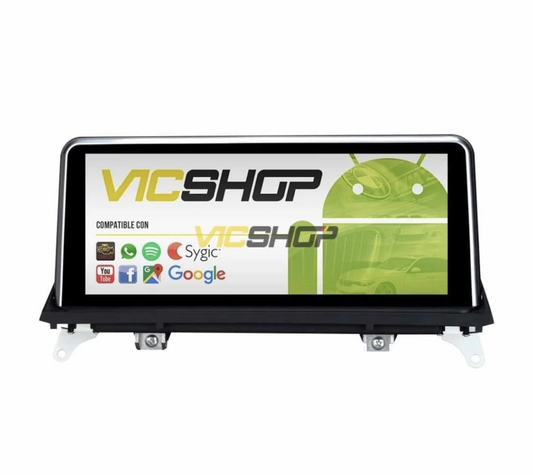
Renew your BMW X4 Series F26 with the latest technology. Our Android Auto/Carplay radio screen not only modernizes your car, but also improves your driving experience. With a high-definition IPS multi-touch screen and a powerful integrated DSP chip, you'll enjoy a fast and versatile system. This device is designed to offer an intuitive user experience, allowing quick access to all your favorite applications, whether for navigation, music or communication. Integration with Android Auto and CarPlay ensures you can keep your attention on the road while accessing important functions on your smartphone.
Table of Contents
Technical characteristics
The radio screen for BMW Series User interface is highly customizable, meaning you can adjust the menus and shortcuts to your personal preferences.
Key specifications
The screen includes Android Auto and CarPlay, allowing full integration with iOS and Android devices. In addition, it is compatible with ADAS DVR rear and front cameras, and tire pressure monitoring systems. Connectivity is assured thanks to its WiFi and Bluetooth functionality. This means you can connect your mobile device wirelessly to enjoy your playlists, answer calls or even send text messages using voice commands, always keeping your attention on the road. IPS touchscreen technology offers a wide viewing angle, making it easy to use from any position inside the vehicle.
| Parameter | Value | Notes |
|---|---|---|
| Screen Size | 8.8" / 10.25" / 12.3" | To choose according to preference |
| Resolution | HD | High definition for clear viewing |
| Processor | 8 cores | Fast and efficient performance |
| RAM/ROM | 4GB/64GB | Enough for multiple applications |
| GPS | Incorporated | Maps of Europe included |
| Compatibility | CarPlay, Android Auto | Complete integration with smartphones |
| Connectivity | Wi-Fi, Bluetooth | Multiple connections |
| Guarantee | 2 years | Technical service in Spain |
Compatibility with BMW models
This system is designed specifically for the BMW X4 Series F26, ensuring seamless integration without the need for additional modifications. Compatible with CCC, CIC, NBT and EVO systems, it adapts to the specific configuration of each car, ensuring that all steering wheel controls and original vehicle functions remain intact. This is crucial to maintaining the original BMW driving experience, allowing the driver to enjoy all the modern functionalities without sacrificing the design and functionality of the vehicle. The installation is so precise that no additional adjustments are required on the control panel, ensuring that the system integrates perfectly with the car's interior styling.
Compatibility details
The screen is compatible with Harman/kardon audio systems and does not require special cables, since everything necessary is included in the package. It is important to verify exact compatibility through the vehicle's chassis number. This ensures that any particularities of the specific model of your BMW are taken into account, avoiding surprises during installation. In addition, compatibility with the iDrive system allows users to continue using the steering wheel controls to manage functions such as volume, navigation and taking calls, improving driving safety.
| Body/series | years | Headlight type | Hoop position/diameter | Observations |
|---|---|---|---|---|
| BMW X4 F26 | Data not available | Data not available | Data not available | Compatible with CCC/CIC/NBT/EVO systems |
Advantages and benefits
Installing this screen in your BMW not only modernizes the interior of your vehicle, but also offers advanced navigation and connectivity features. Whether you use Google Maps, Apple Music or any other application available in the Play Store, you will enjoy a more connected and entertaining driving experience. Additionally, the user interface is designed to be intuitive, allowing quick and easy access to all functionalities, even while driving. The highly sensitive touch screen responds quickly to commands, which is essential for making quick adjustments while you're on the move.
Additional benefits
The pre-installed GPS navigation system includes detailed maps of all of Europe, making it easy to plan travel routes. With the ability to play videos in 4K, you'll enjoy superior audiovisual quality during your travels. In addition, Bluetooth connectivity allows for hands-free calling, which increases safety behind the wheel. The possibility of customizing the system according to your personal preferences is another of the great attractions of this product. Integration with music and video streaming apps ensures you always have entertainment at your disposal, no matter the length of the trip.
Step by step installation
Installing the screen is simple and does not require specialized tools, but it is advisable to have a technician if you do not have previous experience. Below are the basic steps:
Installation Guide
- Carefully remove the existing screen from the dashboard. This may require the use of plastic removal tools to prevent damage to the board.
- Connect the cables and adapters provided with the new display. Be sure to follow the instructions in the manual to avoid incorrect connections.
- Place the screen in the intended location and make sure it is secure. It is important that the screen is well supported to avoid vibrations while driving.
- Verify that all steering wheel controls and functions are operational. This includes testing all of the infotainment system's functions to make sure everything is working properly.
- Perform a road test to ensure the functionality of the GPS and audio systems. Make sure navigation is accurate and sound is clear and uninterrupted.
Maintenance and care
To ensure the longevity of your radio screen, it is important to follow certain care. Keep the screen clean using a soft microfiber cloth and avoid using abrasive chemicals that could damage its surface. Also, be sure to perform software updates regularly to keep the operating system optimized. Updates not only improve system functionality, but may also include security improvements and new features. Consider setting reminders to check for firmware updates that can improve system stability.
Maintenance tips
Periodically check the cable connection to avoid system failures, and if you detect any operating problems, contact technical service for a professional evaluation. It is advisable to perform a complete system check at least once a year to ensure proper functioning and prevent future problems. Also, make sure the vents are not blocked to prevent the system from overheating, especially during the summer months.
Real use cases
Many BMW X4 F26 drivers have chosen to install this screen, highlighting significant improvements in the driving experience. From the ability to plan travel routes with detailed maps to enjoying high-quality music and videos, users report a notable improvement in in-flight connectivity and entertainment. Ease of use and seamless integration with the iDrive system are aspects highly valued by users, who appreciate being able to control all functions from a single device. The ability to customize the interface has also been highlighted by users, who enjoy adapting the system to their personal preferences.
User Testimonials
User feedback highlights the ease of use and seamless integration with the iDrive system, allowing for an unprecedented luxury experience. One user commented: "Installation was easy and the change in driving experience is impressive. I can now access all my favorite apps from the car screen, making every trip more enjoyable." Another user mentioned: "The screen quality is excellent, and the system never slows down, even when using multiple apps at once."
Common mistakes to avoid
A common mistake is not checking system compatibility before installation. Be sure to provide the VIN to the supplier for accurate configuration. Also, do not attempt to install the screen without prior experience or without following detailed instructions, as you could damage the vehicle's electrical system. Improper installation can lead to problems such as loss of functionality of the steering wheel controls or interference in the audio system. It is essential to follow the instructions step by step to avoid any inconvenience.
Installation errors
Avoid connecting cables incorrectly and ensure that all components are well secured to avoid failures while driving. Careless installation can result in annoying vibrations or noises, which could affect your driving experience. If you are not sure how to proceed, it is best to consult a professional. Remember that proper installation not only guarantees optimal operation of the system, but also prolongs its useful life.
Frequently asked questions
- Does it fit perfectly?
- Yes, this screen has been designed specifically for the BMW X4 F26, ensuring perfect and seamless integration.
- Does it start with the BMW logo?
- Yes, but it is possible to change it to another logo if desired, allowing complete customization of the system.
- Does the multifunction steering wheel still function?
- Yes, it is fully compatible and requires no additional configuration, making it easy to use right out of the box.
- Is it compatible with iPhone?
- Yes, it offers full compatibility with iOS devices, allowing the use of CarPlay for seamless integration.
- What happens if my radio does not have AUX output?
- A free FM transmitter is provided to solve this problem, ensuring that you can enjoy all the functions of the system without restrictions.
Conclusion
The Android Auto/Carplay radio screen for BMW Series X4 F26 is an investment that transforms your driving experience. Be sure to check compatibility and follow installation instructions to maximize its benefits. This product not only improves the functionality of your vehicle, but also increases its value and aesthetic appeal. With proper installation and regular maintenance, you will enjoy an improved driving experience for many years. The ability to integrate modern technology without compromising the vehicle's original aesthetics is one of the biggest attractions of this system.
For more details, visit the product page.
- bmw android screen
- bmw x4 series radio
- android auto for bmw
- carplay bmw x4
- gps bmw android
- bmw multi touch screen
- bmw x4 f26
- bmw x4 series bluetooth
- bmw screen installation
- bmw x4 accessories
Content reviewed by automotive technician.
Note: Check the compatibility in the technical sheet before purchasing.