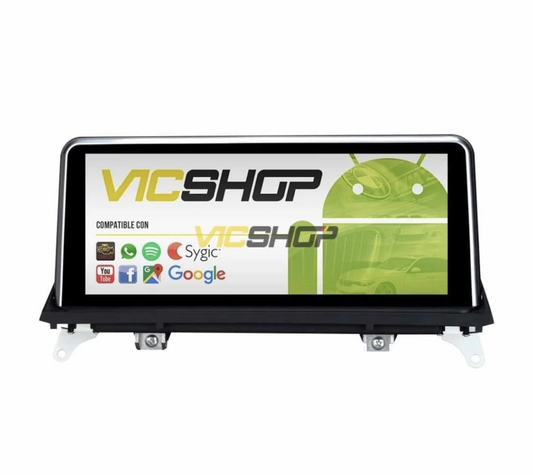
Android Auto/Carplay screen for BMW 7 Series F01 F02
Android Auto/Carplay screen for BMW 7 Series F01 F02
Update your BMW 7 Series F01 F02 with a next-generation Android screen. Enjoy a modern driving experience with advanced features like CarPlay, Android Auto and a free rear camera. This multi-touch screen with IPS not only improves the aesthetics of your vehicle, but also offers endless technological possibilities for your comfort and safety. The integration of this screen will allow you to access your favorite applications, manage calls and messages securely, and use advanced navigation systems without having to take your eyes off the road. Plus, its intuitive, easy-to-use design ensures you can access all features quickly and efficiently, making every trip more enjoyable and safe.
Technical characteristics
The Android screen for BMW 7 Series F01 F02 is an advanced technological solution that provides multiple functions to your vehicle. Its features include the ability to transform your driving experience with a complete multimedia system that adapts to your daily needs. Its elegant and functional design is complemented by an intuitive user interface that makes it easy to access all its functions. Additionally, its quick responsiveness and compatibility with a wide range of applications make it a valuable addition for any driver looking to enhance their driving experience.
Screen and performance
With a size of 10.25" or 12.30", the multi-touch screen with IPS technology guarantees HD resolution for clear and sharp viewing. It is equipped with an integrated DSP chip and a processor with up to 8 cores, accompanied by 4GB of RAM and 64GB of ROM, which ensures smooth and fast performance. This configuration allows multiple applications to be handled simultaneously without loss of speed, which is ideal for those who use their vehicle as an extension of their office or for entertainment on long trips. Additionally, the display is designed to minimize reflections and improve visibility in variable light conditions, ensuring you can always see the information you need.
In addition, it includes a powerful GPS unit with pre-installed maps of all of Europe, and is compatible with additional navigation applications such as Google Maps and SYGIC. This means that, regardless of your destination, you will always have the most efficient and up-to-date routes at your disposal, reducing travel time and improving road safety. The ability to update maps over the internet ensures that you always have the latest information, which is crucial to avoid unexpected delays due to changes in traffic conditions or road infrastructure.
| Parameter | Value | Notes |
| Screen size | 10,25"/12,30" | IPS multi-touch |
| Resolution | HD | - |
| Processor | Up to 8 cores | - |
| RAM | 4GB | - |
| ROM | 64GB | - |
| GPS | Integrated | Maps of Europe |
| Operating system | Android | - |
Compatibility with BMW models
This system is specifically designed for the BMW 7 Series F01 and F02 models, ensuring perfect fit and optimal operation. Compatible with CCC, CIC and NBT systems, it adapts perfectly to the vehicle's factory configurations. This means that not only will it look like an original part of the car, but it will also work seamlessly with existing controls such as those on the steering wheel and audio systems. Seamless integration ensures that there are no interruptions to the vehicle's functionality, allowing you to enjoy all the features of the screen without compromising other functions of the car.
Configuration and settings
Once the order is placed, the VIN will be requested to match the system to the exact specifications of your BMW, including the type of integrated navigation system. This custom process ensures that each unit works optimally with your vehicle's unique characteristics, resulting in a hassle-free user experience and superior performance. System customization ensures that all functions are aligned with user expectations, offering an improved driving experience tailored to your specific needs.
| Body/series | years | Headlight type | Hoop position/diameter | Observations |
| Series 7 F01/F02 | Data not available | Data not available | Data not available | Compatible with CCC/CIC/NBT |
Advantages and benefits
Incorporating this Android screen in your BMW offers you multiple benefits, from a modern and elegant design to improved functionality. With internet connectivity via WiFi or SIM card, you can enjoy applications such as Apple Music, Spotify and more, directly from your screen. This connectivity allows you to always be connected, whether to receive real-time traffic updates or to enjoy your favorite playlists without interruptions. Additionally, the ability to connect to the internet means you will always have access to the latest software updates, ensuring your system is always up to date with the latest improvements and features.
In addition, the screen offers the possibility of customizing the interface, allowing you to adapt the system to your personal preferences. You can organize apps and widgets according to your daily needs, making it easy to access the features you use most. CarPlay and Android Auto integration ensures you can safely use your phone while driving, minimizing distractions and improving safety. The customizability also means that you can change the appearance of the interface to best suit your personal style, making every interaction with the system more enjoyable.
Step by step installation
Installation of the screen is simple and does not require complex modifications. Here we leave you the basic steps to follow:
- Disconnect the vehicle battery to avoid short circuits. This step is crucial for your safety and that of the car's electrical system.
- Remove the original screen from the dashboard. Be sure to save the screws and parts for possible future reinstallation.
- Connect the cables and adapters provided with the new display. Follow the instructions in the manual to ensure a correct connection and avoid damage to the components.
- Install the new screen on the dashboard. Make sure it is securely fastened to avoid vibrations or movements while driving.
- Reconnect the battery and turn on the system to check operation. Perform a full function check to make sure everything is in order.
Tools: Data not available
It is advisable to perform a test drive after installation to verify that all functions are operational and that there are no compatibility issues. If you encounter any problems, check the connections and make sure all cables are installed correctly.
Maintenance and care
To keep the screen in optimal condition, it is recommended to clean it regularly with a soft cloth and avoid using chemicals that could damage the surface. Also, be sure to update the software regularly to enjoy the latest improvements and features. Updates not only add new features, but also fix bugs and improve system security, ensuring that your user experience is always the best possible. Proper maintenance not only extends the life of the screen, but also ensures that it always functions optimally.
It is important to perform regular system maintenance to avoid long-term problems. This includes checking that all cables are securely connected and that there are no signs of wear on components. A helpful tip is to set reminders to check your system every six months, ensuring everything is working properly and software updates are installed.
Real use cases
Many users have significantly improved their driving experience with this screen, enjoying an intuitive interface and access to a wide range of applications and services. For example, one user commented that the ability to integrate his calendar and work applications has allowed him to manage his commitments more efficiently while moving between meetings. Another user highlighted how the integration of streaming music services has transformed his daily commute, allowing him to enjoy his favorite music without interruptions.
User Testimonials
BMW 7 Series owners have reported improved connectivity and navigation, highlighting the ease of use and integration with steering wheel controls. One customer mentioned that the sound quality has improved significantly thanks to the DSP chip, which has transformed his listening experience in the car. Another user noted that the ability to customize the interface has allowed them to adapt the system to their preferences, making each trip more enjoyable and personalized.
One satisfied user mentioned that installation was easier than expected, thanks to clear instructions and available technical support. This allowed you to enjoy all the functions of the screen without complications, improving both your daily driving experience and that of your long trips. The ability to access entertainment and productivity apps has made your time in the car more productive and enjoyable.
Common mistakes to avoid
Avoid common mistakes such as not disconnecting the battery before installation or not properly securing the screen in place, which could cause malfunctions. Also, be sure to follow the installation instructions exactly to avoid damage to the vehicle's electrical system. A common mistake is not checking the compatibility of the system with the specific car model, which can lead to integration problems. Make sure you have all the necessary information before starting the installation to avoid any mishaps.
Another common mistake is not performing a thorough test after installation to ensure that all functions operate correctly. It is crucial to verify that the GPS, internet connectivity, and integration with the audio system are working as expected. If any problem is detected, check the connections and consult the user manual to resolve any issues.
Frequently asked questions
- Does it fit perfectly? Yes, this screen has been designed specifically for the BMW 7 Series model.
- Does it start with the BMW logo? Yes, and you can change it if you want.
- Does GPS work while listening to music? Yes, you can use both functions simultaneously.
- Is it compatible with iPhone? Yes, it is 100% compatible with iPhone devices.
- Do I need any special cables? No, all necessary cables are included.
Conclusion
The Android screen for BMW 7 Series F01 F02 is an investment in technology and comfort, improving both the functionality and aesthetics of your vehicle. With easy installation and technical support available, it is an ideal choice for those looking to modernize their driving experience. Its ability to integrate multiple functions into a single device makes it an indispensable tool for those who value cutting-edge technology in their vehicle. In addition, the possibility of customizing the system ensures that each user can adapt the experience to their specific needs, making each trip more comfortable and enjoyable.
The screen not only improves the functionality of the vehicle, but also adds a touch of modernity and sophistication to the interior of the car. The ease of use and wide range of available features make it an attractive option for any BMW 7 Series owner looking to enhance their driving experience. The combination of advanced technology and intuitive design ensures that every interaction with the system is seamless and satisfying.
Buy screen for BMW 7 Series F01 F02- bmw 7 series android screen
- carplay bmw
- android car bmw
- bmw rear camera
- bmw gps navigator
- bmw multimedia system
- bmw 7 series update
- bmw touch screen
- multimedia bmw 7 series
- bmw android compatibility
Content reviewed by automotive technician. Always check the compatibility in the technical sheet before making the purchase.