
Android Auto Radio Screen and Carplay for BMW X5 E53 with camera
Android Auto Radio Screen and Carplay for BMW X5 E53
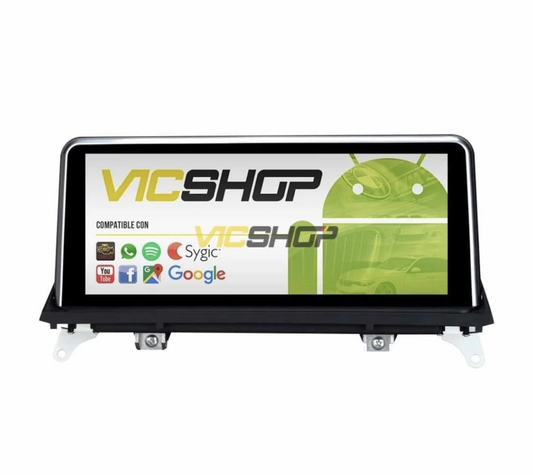
Improve your driving experience with the new 7-inch Android radio screen for the BMW X5 Series E53. This device not only modernizes the interior of your car, but also offers full integration with Android Auto and CarPlay. Plus, it includes a free rear camera to make your parking maneuvers easier! This additional feature not only increases the value of the product, but also adds an extra level of safety when maneuvering in tight spaces. The rear camera is particularly useful in heavy traffic situations or when parking in tight spaces, providing a clear and accurate view of the area behind the vehicle. This improved visibility significantly reduces the risk of accidents and vehicle damage, which is especially beneficial in congested urban areas.
Technical characteristics
The radio screen for BMW X5 E53 includes a series of advanced features that make it an ideal option for any driver looking to improve their vehicle. With an IPS multi-touch screen, this radio offers excellent image quality and fast response. The integrated DSP chip ensures superior sound processing, while the powerful built-in GPS offers up-to-date European maps. Internet connection is possible thanks to compatibility with mobile SIM cards, providing unlimited access to applications such as Spotify, Apple Music and more. This connectivity allows users to enjoy their favorite playlists, receive real-time traffic updates and access streaming services without interruptions. Additionally, the ability to update maps ensures that you always have the latest information on routes and traffic conditions. The integration of these features makes this display an indispensable tool for modern drivers who value both functionality and aesthetics.
IPS multi-touch screen
IPS technology guarantees optimal visibility from any angle, making browsing and using applications more comfortable and safer. This technology is especially useful during sunny days where glare can be a problem. Additionally, the multi-touch screen allows for more intuitive, smartphone-like control, making it easier to access vehicle functions without unnecessary distractions. The sensitivity of the screen ensures that even with gloves on, the driver can interact with the system effectively, which is ideal in cold weather. This responsiveness is also crucial while driving, allowing quick adjustments to be made without compromising attention on the road.
Compatibility with BMW models
Designed specifically for the BMW X5 E53, this screen fits perfectly on the dashboard without the need for modifications. It ensures continuity of steering wheel controls and is fully compatible with audio systems such as Harman Kardon and Alpine. This compatibility ensures that users do not lose any original functionality of the vehicle, maintaining the driving experience that BMW is known for. Additionally, installation is simple and does not require advanced mechanical or electronic knowledge, allowing owners to perform the upgrade themselves or with the help of a professional. Integration with the vehicle's electrical system is seamless, ensuring that all car functions work correctly after installation. This is particularly important to preserve the vehicle's warranty and ensure that all safety and comfort features continue to operate as expected.
Seamless integration
Compatibility with ADAS tire pressure monitoring system and cameras provides a safer driving experience. These advanced features allow drivers to be aware of their vehicle's condition at all times, reducing the risk of accidents and improving vehicle efficiency. Additionally, integration with driver assistance systems (ADAS) provides visual and auditory alerts that can prevent collisions and facilitate driving in complex urban environments. The ability to receive real-time alerts on tire pressure and other critical vehicle parameters is invaluable for maintaining safety on the road. These features not only improve safety but also optimize vehicle performance, ensuring that drivers can enjoy a worry-free driving experience.
Advantages and benefits
In addition to modernizing your car, this screen offers multiple benefits, such as a high-precision navigation system, Bluetooth hands-free connection and the ability to download applications directly from the Play Store. Accurate navigation is essential for long journeys or when exploring new areas, ensuring drivers reach their destination efficiently. The Bluetooth connection allows you to make calls without having to take your hands off the wheel, improving safety while driving. The ability to customize the home screen with widgets and shortcuts to your most used apps adds a level of convenience and personalization that many drivers value. Additionally, access to real-time traffic and weather apps can help drivers plan their routes more effectively, avoiding traffic jams and adverse weather conditions.
Connection and entertainment
The ability to connect Android and iPhone devices allows unrestricted access to music, maps and other essential applications. This means drivers can customize their driving experience to their personal preferences, whether listening to their favorite podcast or using advanced navigation apps. Plus, the ability to receive notifications and messages directly on the screen helps keep your attention on the road. The integrated voice command function allows you to control many system functions without having to touch the screen, which is a great advantage for maintaining concentration while driving. This functionality is especially useful on long trips, where comfort and ease of use are paramount for an enjoyable driving experience.
Step by step installation
Installing the screen is simple, thanks to the included cables and adapters. Here we offer you a basic guide so you can carry out the installation yourself. This process is not only an opportunity to customize your vehicle, but also to learn more about its inner workings. Installation can be an ideal weekend project for those who enjoy working on their vehicles and want to improve their knowledge of automotive technology. Additionally, performing the installation in person can offer great satisfaction and a sense of accomplishment in completing the vehicle upgrade yourself.
Tools needed
Tools: Data not available. Although the list of specific tools is not available, it is generally recommended to have a Phillips screwdriver, a set of Allen wrenches, and a plastic pry tool on hand to remove the panels without damaging them. Additionally, a multimeter can be helpful to check electrical connections and ensure everything is working properly before completing the installation. Having these tools on hand not only makes the installation process easier, but also helps prevent accidental damage to vehicle components.
- Disconnect the vehicle battery to avoid short circuits. This step is crucial to protect both the vehicle and the installer from electrical shock. Make sure the vehicle is on a flat, stable surface before starting.
- Remove the original radio from the vehicle. Be sure to keep all screws and removed parts in a safe place to facilitate reinstallation if necessary. Use appropriate tools to avoid damaging the dashboard or surrounding components.
- Connect the cables for the new screen following the instructions provided. It is important to follow the connection diagram to the letter to ensure optimal operation of the device. Double check each connection to avoid future problems.
- Install the rear camera on the back of the vehicle. Make sure the camera is properly secured and aligned to provide a clear and accurate image. Test the camera in different lighting conditions to ensure its effectiveness.
- Test the functionality of the screen and camera before completing the installation. This includes checking sound quality, image clarity, and GPS accuracy. Take a test drive to make sure everything works properly while the vehicle is moving.
Maintenance and care
To ensure the longevity of the screen, it is important to perform regular maintenance. This includes cleaning the screen with a soft, dry cloth and checking the connections periodically. Proper maintenance not only extends the life of the device, but also ensures that it always functions optimally. Regularly updating software is also crucial to keeping the system secure and efficient, ensuring that all applications run with the latest technology available. Additionally, regular maintenance can prevent unexpected problems and keep the user experience at its full potential.
Recommendations for care
Avoid using harsh chemicals that could damage the screen or internal components. Instead, use specific cleaners for electronic screens that do not leave residue or scratch the surface. Additionally, it is advisable to check the electrical connections every six months to ensure that there are no loose or frayed cables. Keeping your system updated with the latest software versions is also essential to ensure the best performance and security. These practices not only preserve the functionality of the system but also ensure that the user can enjoy all the advanced features without interruptions.
Real use cases
Many users have improved their driving experience with this screen, enjoying more precise navigation and easier access to their favorite applications. These use cases highlight how technology can transform the daily driving experience, making even the most routine journeys more enjoyable and efficient. The ability to customize the interface and access a wide range of applications has been a game-changer for many drivers, allowing them to tailor the system to their specific needs. Additionally, integration with safety and driver assistance systems has given users greater confidence on the road, especially in difficult driving conditions.
User experiences
Drivers highlight ease of use and improved sound quality as the biggest benefits of this update. Additionally, many users appreciate the ability to customize the interface and how quickly it connects to their mobile devices. Positive user feedback underlines the importance of having a modern and functional infotainment system in the vehicle. Some users have mentioned that the integration with the vehicle's safety systems has improved their confidence when driving in difficult conditions. These experiences underscore how a technology upgrade can have a significant impact on overall user satisfaction and vehicle safety.
Common mistakes to avoid
When installing and using your display, it is important to avoid some common mistakes that can affect its operation. These errors can include incorrectly connecting cables, improperly installing the rear camera, or using improper tools that can damage vehicle components. Attention to detail during installation is crucial to ensure the system works correctly the first time. Additionally, following the manufacturer's instructions closely can prevent many common problems and ensure a successful installation.
Precautions during installation
Be sure to follow the installation instructions exactly and check all connections before turning on the device. Additionally, it is advisable to perform a full test of all functions before considering the installation complete. This includes checking sound quality, camera image clarity, and GPS accuracy. Consider seeking professional help if you are unsure about any step in the process, as incorrect installation can lead to more serious problems in the future. Investing in a proper installation ensures that the system operates optimally and that the vehicle maintains its value and functionality.
Frequently asked questions
Below we answer some of the most common questions about this screen for BMW. These answers are designed to help users make informed decisions and resolve any questions they may have before purchasing. The information provided here reflects the most common user concerns and offers clear and concise solutions. These FAQs can also serve as a quick guide to resolving minor issues that may arise while using the system.
Does it fit perfectly?
Yes, this screen has been designed specifically for the BMW X5 E53, guaranteeing a perfect fit. This ensures that installation is simple and that the aesthetics of the vehicle's interior remain intact. The integration with the vehicle's interior design is so precise that it looks like a factory installation. This attention to detail ensures that drivers can enjoy an enhanced driving experience without compromising the vehicle's original appearance.
Conclusion
The Android radio screen for BMW X5 E53 is a safe investment to improve your car. With its wide range of features and ease of use, it is the perfect choice for any BMW owner looking to modernize their vehicle. By integrating cutting-edge technology with an intuitive design, this screen transforms the driving experience, making every trip safer, more comfortable and more entertaining. For more information and to make your purchase, visit Buy radio screen for BMW X5 E53. Deciding to upgrade your vehicle's infotainment system not only improves everyday functionality, but can also increase the car's resale value by offering modern and desirable features. This upgrade is an investment in the comfort, safety and enjoyment of the vehicle, ensuring that every trip is a pleasant and stress-free experience.
- bmw radio screen
- android car bmw
- bmw x5 e53
- carplay bmw
- bmw rear camera
- bmw integrated gps
- bmw steering wheel control
- bmw bluetooth
- bmw touch screen
- bmw multimedia
Content reviewed by automotive technician. Note: Check the compatibility in the technical sheet before purchasing. This review ensures that the information provided is accurate and relevant to potential buyers, helping them make informed decisions about upgrading their vehicles. Accuracy of technical details and clarity of instructions are essential to ensure a positive and hassle-free user experience.