
Android Radio Screen for BMW 3 Series F30 F31 F34
Android Radio Screen for BMW 3 Series F30 F31 F34
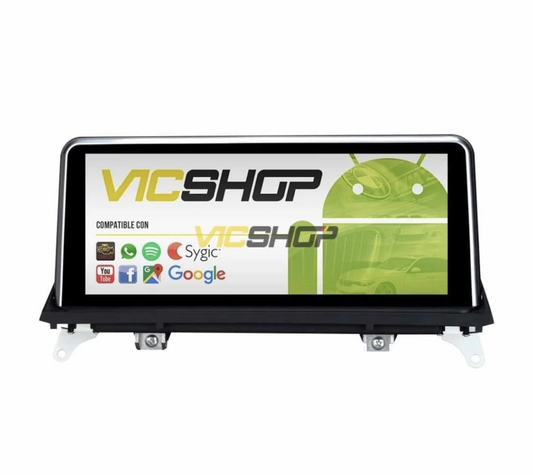
The Android radio screen for BMW 3 Series F30 F31 F34 is the ideal solution to modernize your vehicle. With a multi-touch interface and a powerful operating system, this screen significantly improves the driving experience, maintaining full control over the car's functions. In addition, its elegant and minimalist design integrates perfectly with the BMW interior, offering a modern and sophisticated appearance. This integration is not only aesthetic, but also functional, as it allows the driver to feel comfortable and safe when using the different functions without distractions. Ease of access to frequently used functions such as audio control and navigation ensures that the driver can focus on the road while enjoying the technological conveniences this screen offers.
Technical characteristics
This screen has a series of advanced features that make it an essential accessory for your BMW. It is available in two sizes, 10.25" and 12.3" inches, both with IPS technology for better visibility. This technology ensures that the screen is visible from any angle, which is especially useful when the sun is shining directly on it. It incorporates a DSP chip that ensures high-quality audio processing, allowing you to enjoy clear and powerful sound, ideal for music lovers. Additionally, the display features an intuitive user interface that makes it easy to use even for those unfamiliar with modern technology. The interface is customizable, allowing the user to adjust the icons and shortcuts according to their preferences, which further improves the user experience.
Resolution and performance
The screen offers HD resolution that guarantees clear and sharp images. Equipped with a processor with up to 8 cores, 6GB of RAM and 128GB of storage, it allows the use of intensive applications without performance problems. This means you can run multiple apps at the same time without experiencing lag, which is crucial for a smooth user experience. In addition, it includes an integrated GPS with maps of all of Europe, making road navigation easier. This is especially beneficial for frequent travelers as it provides updated routes and traffic options in real time. Additionally, the storage capacity allows you to store a large amount of music, videos and applications, ensuring that you always have access to your favorite content while you are on the go. The ability to download additional apps from the Google Play Store expands the system's functionality, allowing you to further personalize your driving experience.
Compatibility with BMW models
This screen is compatible with BMW 3 Series F30, F31 and F34 models, and works with both CCC, CIC, NBT and EVO systems. It is installed directly on the dashboard, replacing the original screen, and is fully compatible with the multifunction steering wheel. This means you can still use the steering wheel controls to change songs, adjust the volume or answer calls, keeping your hands on the wheel and your eyes on the road. Compatibility with these systems ensures that you will not lose any of your vehicle's original functions, which is crucial to maintaining safety and comfort while driving. Additionally, integration with existing audio systems ensures that sound quality is maintained or even improved, providing an immersive listening experience.
Adaptation to different systems
To ensure compatibility, the VIN is requested upon purchase, allowing specialists to configure the display for your specific BMW model. Compatibility is guaranteed even if your vehicle has a Harman/kardon audio system. This level of customization ensures that each screen is perfectly tailored to your vehicle's specifications, avoiding compatibility issues and ensuring optimal performance. Additionally, this custom fitting process ensures that installation is as simple as possible, minimizing installation time and reducing the risk of errors. Attention to detail in the setup process ensures that every vehicle function integrates harmoniously with the new display, providing a seamless user experience.
Advantages and benefits
The installation of this screen provides multiple benefits: from the improvement in sound and video quality thanks to the DSP chip and compatibility with 4K videos, to the ease of use provided by the applications available in the Google Play Store. You can download your favorite applications, such as Google Maps, Spotify or YouTube, and access them directly from your car screen, making each trip more entertaining and functional. Furthermore, the possibility of customizing the user interface with different themes and wallpapers allows each driver to adapt the system to their personal preferences, making the use of the system even more pleasant and personalized. The ability to switch between different display modes also allows the screen to be adjusted for different lighting conditions, ensuring optimal visibility at all times.
Interactivity and connectivity
With its Bluetooth and WiFi connectivity, it allows access to streaming applications such as Spotify and Apple Music, and guarantees a hands-free experience behind the wheel. In addition, its compatibility with rear and front cameras improves safety while driving. The rear camera, which is included as a gift, makes parking maneuvers easier by providing a clear view of what is behind the vehicle. This is especially useful in tight parking spaces or low visibility situations. Advanced connectivity also allows for integration with mobile devices, meaning you can take calls, send messages and access your favorite apps without taking your attention off the road. The ability to connect multiple devices at the same time ensures that both the driver and passengers can enjoy their favorite content during the trip.
Step by step installation
The installation of the screen must be carried out carefully, following a series of steps to ensure its correct operation. Although installation is relatively simple, it is recommended to have some experience in handling tools and electronic components to avoid damage. A common mistake is not following the specific instructions for each model, which can result in incorrect installation and potentially damage to the vehicle. Additionally, it is important to have an adequate, well-lit workspace to avoid errors during the installation process.
- Gather the necessary tools (Tools: Data not available).
- Remove the original screen from the dashboard. It is important to follow the specific instructions for your BMW model to avoid damaging the dashboard or electronic components.
- Connect the provided cables and adapters. Make sure each connection is securely secured to avoid operation problems.
- Place the new screen on the dashboard. Check that the screen is properly aligned and secured to avoid vibrations while driving.
- Test the operation of the screen, including the connection to the multifunction steering wheel. Make sure all features, such as GPS and audio, are operational.
Installation Tips
It is important to verify that all cables are well connected and that the screen is well fixed to avoid vibrations. Additionally, it is recommended to test all features before completing the installation. If you encounter any problems, check the connections and make sure the cables are not damaged. If in doubt, it is best to contact a professional to avoid further damage. Also, make sure you have a clean and organized workspace to avoid losing small parts or tools during the installation process. Using proper tools and following instructions carefully can prevent most common installation problems.
Maintenance and care
To ensure a long lifespan, regular maintenance of the screen is necessary. This includes cleaning the surface with a soft, dry cloth and regularly updating the software. Avoid using harsh chemicals that may damage the screen coating. Additionally, it is advisable to check the cable connections from time to time to ensure that they have not become loose over time. Keeping your system up to date not only improves performance, but can also prevent security issues that could arise with outdated software versions. Proper maintenance also includes checking the integrity of cables and connections, ensuring that there is no wear or damage that could affect the operation of the system.
Software update
Software updates not only improve display performance but also bring new features. It is advisable to regularly check if new versions are available. These updates can include user interface improvements, security patches, and new applications, ensuring your system is always up to date with the latest technological innovations. Additionally, updates can resolve minor issues that may arise over time, ensuring that the screen functions optimally at all times. The ease of updating over WiFi ensures that the process is quick and easy, allowing you to enjoy the improvements without complications.
Real use cases
Many users have found that the screen radio significantly improves their driving experience, especially for those who take long trips and need a reliable navigation system and entertainment options. The ability to customize the system with specific applications and settings makes each trip unique and tailored to the driver's needs. Plus, integration with real-time traffic services and up-to-date maps ensures you always get to your destination as efficiently as possible. The ability to receive real-time traffic alerts and route changes is especially useful for those driving in congested urban areas.
User Testimonials
Users highlight the ease of installation and sound quality as two of the main advantages of this screen. In addition, the possibility of customizing the start with your preferred logo is another highly valued aspect. One user commented that the integration with his smartphone was perfect, allowing him to access his contacts and applications easily and safely while driving. Another user mentioned that the screen significantly improved their night driving experience thanks to the clarity of the image and the ease of use of the interface. The ability to adjust screen brightness and contrast was also mentioned as a useful feature for different lighting conditions.
Common mistakes to avoid
One of the most common mistakes is not properly securing the screen, which can cause vibrations or disconnections. It is also crucial not to force connections during installation. Mishandling cables can cause irreparable damage to electronic components, so it is essential to follow instructions exactly. Also, make sure not to overtighten the fixing screws, as this could damage the screen frame or the vehicle's dashboard. Patience and attention to detail during installation can prevent most of these problems, ensuring a successful and long-lasting installation.
Recommendations to avoid errors
Check that all cables are properly aligned before connecting them and be sure to follow the installation instructions exactly. If you have doubts, it is advisable to contact a specialized technician. Also, make sure the screen is well ventilated to prevent overheating, especially in hot weather. Also consider installing a screen protector to prevent scratches and keep the screen in perfect condition for longer. Investing in a quality screen protector can significantly extend the life of your screen, keeping it looking and functional like new.
Frequently asked questions
In this section we answer the most frequently asked questions about the installation and operation of the screen.
Is it compatible with my BMW model?
Yes, as long as it is a series 3 F30, F31 or F34. To ensure compatibility, the chassis number is required. This allows you to verify the exact specifications of your vehicle and ensure the screen fits perfectly.
Do I lose control of the multifunction steering wheel?
No, the screen is 100% compatible with steering wheel controls. This means you can continue to use all steering wheel functions without any restrictions, improving driving safety and comfort.
Do I need any additional parts for installation?
No, all necessary cables and adapters are included in the package. This makes installation easier and ensures that you won't have to purchase additional components, saving time and money.
How is the rear camera connected?
The camera is activated automatically when you engage reverse gear, without the need for additional settings. This provides a clear and precise view of what is behind the vehicle, helping to avoid accidents and making parking easier.
What warranty does the product offer?
The product has a 2-year warranty that covers any manufacturing defect. This offers peace of mind to the buyer, ensuring that any problems that arise will be resolved at no additional cost during the warranty period.
Conclusion
The Android radio screen for BMW 3 Series F30 F31 F34 not only modernizes the appearance of your vehicle, but also improves its functionalities, providing a state-of-the-art entertainment and navigation system. With its many advanced features and easy installation, it is an excellent choice for any BMW owner in this series. For more details and to purchase, visit the product page. Furthermore, by choosing this product, you are ensuring a safer and more pleasant driving experience, with access to the latest technologies and an intuitive interface that adapts to your daily needs. Investing in this screen not only improves the aesthetics of your vehicle, but also increases its value and functionality, making each journey a unique and pleasant experience.
- bmw radio screen
- android bmw 3 series
- bmw f30 screen
- bmw 3 series navigator
- bmw touch screen
- carplay bmw 3 series
- improve bmw f31
- gps bmw f30
- bmw android screen
- bmw screen installation
Content reviewed by automotive technician. Note: It is recommended to check the specific compatibility in the product technical sheet before purchasing.