iDrive Controller for BMW Android Display – Advanced Functionality
iDrive Controller for BMW Android Screen
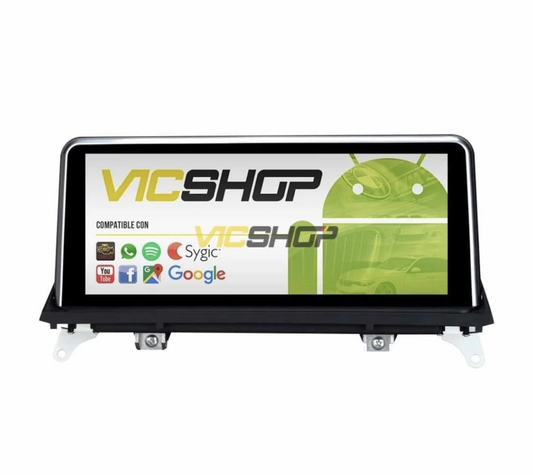
The iDrive controller, known as the central wheel, is an essential tool for operating your BMW's Android radio screen. Purchased through our store, this device offers intuitive control and an improved user experience, guaranteeing easy and quick access to the functions of your multimedia system. Installing this controller not only modernizes the interior of your vehicle, but also improves safety by allowing you to keep your attention on the road while accessing multimedia functions. With its ergonomic design and advanced functionality, the iDrive controller is an investment that optimizes both the aesthetics and operation of your vehicle.
Technical characteristics
The iDrive controller is specifically designed to offer seamless integration with Android screens available for BMW. Its ergonomic design and high-quality finish ensure an optimal user experience. This device is made from durable materials that withstand daily wear and tear, ensuring a long lifespan. In addition, its compact design allows for discreet and elegant installation inside the vehicle. The responsiveness of the controller is remarkable, allowing for smooth and precise interaction with the screen, which is crucial while driving.
Design and functionality
The device has an intuitive user interface that allows you to navigate the options on the screen easily. Its compatibility with Android systems guarantees fluid communication between the controller and the screen. The controller's design is intended to be accessible and easy to use, even while driving. The buttons are logically arranged, allowing quick access to the most used functions, such as adjusting the volume, changing radio stations or navigating the on-screen menu. Additionally, the finish of the controller integrates perfectly with the car's interior design, offering a sophisticated and modern appearance. This not only improves the aesthetics of the vehicle, but also provides a feeling of modernity and advanced technology. Ease of use is a crucial aspect, especially for drivers who value simplicity and efficiency in operating their entertainment and navigation systems.
Compatibility with BMW models
It is crucial to verify the compatibility of the iDrive controller with the specific BMW model before purchase. Although this device is highly versatile, not all BMW models may be compatible due to differences in dashboard design and technology incorporated in each series. Compatibility is a determining factor in ensuring that the controller works correctly and integrates seamlessly with the vehicle's multimedia system.
Supported models
Compatibility may vary depending on year and series of vehicle. It is recommended to review the technical sheet to confirm suitability. Some popular models among users of this controller include the 3, 5, and X series, although it is important to verify the exact specifications of each vehicle. This ensures that the controller runs smoothly and that all available functions are accessible. For older models, additional adjustments may be required during installation to ensure full compatibility. In some cases, a software update may be required to ensure that all controller functions are fully operational. Additionally, it is advisable to consult with a BMW professional or specialist for definitive confirmation on compatibility, especially if the vehicle has been modified or has custom features that could affect installation.
Advantages and benefits
The iDrive controller offers numerous benefits, including safer operation of the multimedia system without distractions while driving. By centralizing control of multimedia functions on a single device, the driver can keep their hands on the wheel and eyes on the road, minimizing distractions and improving safety. This approach is not only safer, but it is also more efficient, allowing the driver to concentrate on the driving experience rather than the operation of the multimedia system.
Improved user experience
By allowing quick and easy access to screen functions, it improves the driving experience. Drivers can adjust the music, change stations or access the navigation system without having to take their eyes off the road. This not only improves comfort, but also contributes to safer and more efficient driving. Additionally, the iDrive controller reduces the time needed to make adjustments to the system, which is especially useful in heavy traffic situations or during long trips. The ability to multitask without compromising safety is a key benefit for modern drivers. The peace of mind of knowing that vehicle functions can be accessed safely and efficiently significantly improves the daily driving experience, making every trip more enjoyable and less stressful.
Step by step installation
Installing the iDrive driver is simple and can be done in just a few steps. Although it is possible to do the installation yourself, it is recommended that it be carried out by a professional to ensure that all connections are made correctly and that the device functions optimally. A professional not only ensures proper installation, but can also offer additional advice on using and maintaining the device.
Installation procedure
1. Disconnect the vehicle battery. This is crucial to avoid short circuits and ensure safety during installation.
2. Remove the panel where the controller will be located. Be sure to do this carefully so as not to damage the interior of the vehicle.
3. Connect the controller to the Android screen interface. Check that the connections are tight and properly aligned.
4. Make sure the connections are tight. This will prevent operating problems in the future.
5. Replace the panel, making sure it is securely fastened.
6. Connect the battery and test the controller operation. Make sure all functions are operational before completing the installation.
Tools: Data not available
Maintenance and care
Maintenance of the iDrive controller is simple, requiring only regular cleaning and checking connections. Proper maintenance not only prolongs the life of the device but also ensures that it functions properly at all times. By keeping the controller in good condition, you ensure that the device continues to provide optimal performance throughout its useful life.
Cleaning and care
Use a soft cloth to clean the controller and avoid using harsh chemicals. These can damage the surface of the device and affect its appearance. Additionally, it is advisable to periodically check the connections to ensure that there are no loose or damaged cables that could interfere with the operation of the controller. Regular maintenance not only preserves the functionality of the controller, but also keeps it looking like new, contributing to the overall aesthetics of the vehicle's interior. Regular cleaning also prevents the buildup of dust and dirt that could affect the performance of the device. It is important to remember that a well-maintained device not only performs better, but also looks more attractive, which is important for those who value the aesthetics of their vehicle.
Real use cases
The iDrive controller is ideal for drivers who want to keep their attention on the road while accessing multimedia functions. This device is especially useful in heavy traffic situations or on long trips, where quick access to information and entertainment is crucial. The ability to operate the multimedia system without distractions is a significant advantage for any driver.
Practical examples
Drivers who use the navigation system or adjust music while driving will find this device particularly useful. For example, a driver who needs to change routes quickly can do so without having to stop, thanks to the quick and easy access provided by the iDrive controller. Additionally, those who enjoy listening to music while driving can adjust the volume or change tracks without losing sight of the road. This type of functionality is especially appreciated on long trips, where comfort and ease of access to multimedia functions are essential. The ability to make adjustments without distraction is critical to maintaining safety and efficiency while driving. Additionally, in emergency situations, where every second counts, the ability to quickly access vehicle functions can make a significant difference in driver response.
Common mistakes to avoid
Avoid common errors such as loose connections that can affect the operation of the controller. These errors can not only cause the device to malfunction, but can also damage other components of the multimedia system. A common mistake is not checking connections after installation, which can result in long-term performance problems.
Recommendations
Check connections regularly to ensure optimal operation. Also, make sure the controller is securely fixed in place to avoid movement that could cause disconnections. If you experience problems with the device, check the connections first before considering other solutions. Keeping the controller in place not only ensures its functionality, but also protects the vehicle's multimedia system from potential damage. Preventing common errors is key to ensuring device longevity and performance. Additionally, following the manufacturer's instructions and consulting with a professional when necessary can avoid many potential problems, ensuring that the controller works as expected.
Frequently asked questions
Some frequently asked questions about the iDrive controller include:
- Is it compatible with all BMW models? Requires verification in the product sheet.
- How does it connect to the screen? Through the Android screen interface.
- Does it need regular maintenance? Regular cleaning is sufficient.
- Is it easy to install? Yes, following the indicated steps.
- Can it interfere with other vehicle systems? Requires verification in the product sheet.
Conclusion
The iDrive controller for Android screens is a valuable addition to your BMW, improving accessibility and driving safety. Be sure to check compatibility before purchasing to ensure the best performance. This device not only improves the functionality of your vehicle's multimedia system, but also contributes to a safer and more enjoyable driving experience. By integrating this controller, drivers can enjoy a more intuitive interface and more precise control of multimedia functions. Investing in this type of technology not only improves the daily driving experience, but also increases the overall value of the vehicle. Additionally, choosing quality products and performing proper installation ensures that your controller will provide reliable service for many years. Consider this device as a significant improvement that provides both in terms of safety and comfort, making each trip more pleasant.
- idrive driver
- bmw android screen
- bmw central roulette
- bmw accessories
- idrive bmw
- bmw technology
- bmw radio screen
- bmw multimedia
- bmw navigation
- safe driving